Showing posts with label Tutorials. Show all posts

Saturday, March 12, 2016

2-Tier Box Tutorial

Hello.

The 2-tier box (pictured above) that I posted in my previous posting, HERE, was the first 2-tier box I made. I encountered a few small problems while putting it together.  I've made a few adjustments to the original design and measurements.  So this tutorial is for, though not exactly the same, a similar 2-Tier Box.  And I like to think it has better construction.

(The measurements on my scoreboard are in inches, so the step-by-step instructions below are in inches.  For those of you who work in centimetres, I've included the templates in centimetres also.  However they're not exact conversion of the ones in inches.  I used the same template drawings though because I'm too lazy...hee hee...to draw another set of templates and just inserted the cm measurements, so they're not to scale, okay?  The metric box is a wee bit smaller, but the measurements are ones that I think are easy to work with.  And yes, you can fit 4 Ferrero Rocher chocolates in each drawer...yay.)

Cardstock pieces required:
one - 7 1/4" x 7 1/4"
two - 9" x 9"
one - 6 1/2" x 6 3/4"
one - 6 1/2" x 7 1/4"


LID


Printable PDF:  2-Tier Box - Lid
Printable PDF:  2-Tier Box - Lid (in centimetres)

Step 1
Place the 7 1/4" x 7 1/4" cardstock piece on the scoreboard and score at 1", 2", 5 1/4" and 6 1/4".
Rotate cardstock 90 degrees to the left/right and score again at 1", 2", 5 1/4" and 6 1/4".


Step 2
Cut and fold as per template above.


Step 3
Glue in place to form your lid.


DRAWERS (create 2)


Printable PDF:  2-Tier Box - Drawer
Printable PDF:  2-Tier Box - Drawer (in centimetres)

Step 4
Place the 9" x 9" cardstock piece on the scoreboard and score at 1 1/2", 3", 6 and 7 1/2".
Rotate cardstock 90 degrees to the left/right and score again at 1 1/2", 3", 6 and 7 1/2".


Step 5
Cut and fold as per template above.


Step 6
Glue in place to form your drawers.


SIDES


Printable PDF:  2-Tier Box - Sides
Printable PDF:  2-Tier Box - Sides (in centimetres)

Step 7
Score the two pieces of cardstock by referring to the templates above for placement of paper on the scoreboard.
- score at 1/2", 3 5/8" and 6 3/4" (on the 2nd piece only)
- rotate 90 degrees and score at 1 5/8" and 4 7/8"


Step 8
Cut and fold as per templates above.


Step 9
Join the 2 pieces together as shown below.


Step 10
Glue in place to form the sides of your box.


Step 11
Glue one of the drawers as shown below, to form the right-side bottom drawer.


Step 12
Glue the other drawer a shown below, to form the left-side top drawer.


Step 13
There you have it!  Now you can decorate the box as you desired.


I'm working on decorating my box further with cutie images and embellishments.  I'll post it when I'm done.

Edited July 21, 2017:  Finally...here's the finished box!  It sure took me a while getting around to it, eh? 


That's it for now.  Have fun crafting!


Sunday, October 18, 2015

Creating Dotted Background Using Alcohol-Ink Markers

Hello.

I'm here with a colouring tutorial.  I've had many people asked me how I create my dotted background, so I'm finally getting around to doing this.


I'm actually not comfortable giving any kind of tutorial on colouring as I'm self-taught.  Or rather, what I know about colouring is what I've learned from reading many many blog tutorials and watching how-to videos readily available on the internet.  As there are so many different colouring techniques and styles, you just have to keep practicing and experimenting until you figure out what works for you.  And I'm continually learning!

I've done a video to better show you the process, but a bit of details first.

So for this dotted background, I'm leaving it up to you to find your colours.  Find 3 markers of your lightest shades (lightest, light, light-medium) in the same tone, so you can get a seamless blend from shade to shade.  Use whatever brand of alcohol-ink markers you prefer, e.g. Promarker, Copic, Touch, Spectrum Noir, etc.

For this demo, I am using Letraset Promarkers and the colours are:
tea green (for the lightest), pebble blue (for the light) and grey green (for the light-medium)

Note:  From the moment that you put ink on the paper you want to work very quickly and not let the ink dries up.  You want to be adding the dots while the ink is still wet because you want the dots to bleed a litlle and the ink to run together between colours.

And remember that the colours may seem too dark at first when you put them on paper, but they will lighten when dry.

And so...here's the video on how I create my dotted background (it's only 4:45 long):


Or watch it on a bigger screen on YouTube:  https://youtu.be/2Z4jSOoxV1Q

Okay, that's it for my one-and-only colouring tutorial...hee hee.  Give it a try and have fun!

Enjoy your day!


Saturday, March 28, 2015

Perpetual Calendar Blocks Tutorial

Here's how to make a Perpetual Calendar Blocks similar to the one I made below and posted a while back HERE.


These are the separate pieces that make up the calendar.


The paper I used is a heavy-weight paper, Strathmore 300 Series Bristol 100lb. (270 g/m²).


Here are the templates I've drawn showing the measurements that I used (sorry, I don't have them in centimetres too):

BLOCKS or CUBES - for the dates
These are 2" blocks.  Create 2 of them.  One block is for the numbers 0, 1, 2, 3, 4 and 5. The other block is for the numbers 0, 1, 2, 6, 7 and 8.  The number 6 also serves as the number 9.


Printable Template in PDF - 2-Inch Block/Cube

Cut, score and fold as per template.


Apply adhesive to the 1/2-inch flaps and adhere to create your block.


4-SIDED BARS - for the months
Create 3 of these 4-sided bars giving you 12 sides for the 12 months of the year.


Printable template in PDF - 4-Sided Bar

Cut, score and fold as per template.  Apply adhesive to the 1/2-inch flap and the side flaps.  Adhere to create a 4-side bar as shown.


DISPLAY CASE


Printable template in PDF - Display Case

Cut, score and fold as per template.


Adhere the two side top flaps to the back of the centre panel as shown.


Optional:  Round the corners as shown--I used a Martha Stewart Corner Rounder punch.


BOTTOM AND BACK PLATFORMS FOR THE DISPLAY CASE
These are required so the blocks and bars can be displayed at an upward tilted angle.


Printable template in PDF - Bottom and Back Platforms for Display Case

Cut, score, fold as per template and adhere as shown.
bottom platform

back platform


You now have all the pieces made up for your calendar--still undecorated though.  At this point, decorate the pieces with your designer/patterned papers, numbers, months, etc. as desired--I won't be decorating my pieces here...hee hee.

This is just to show you where all the pieces will fit AFTER you've decorated your pieces.

The back platform will go here.  Adhere in place.


The bottom platform will go here.  Adhere in place.


The three 4-sided bars with the months on them are to be placed on top of the bottom platform.
The two blocks/cubes with the dates on them are to be placed on top of the bars.


And there you have it!  Happy crafting!


Tuesday, December 30, 2014

Easy Rose Tutorial

Hello.


Here's an easy way to make your own paper roses like the ones on the card below--originally posted HERE.   (Jane has asked me to show her how, so Jane, this is for you!  Sorry it took me this long to getting this tutorial done.)


Supplies required:
- flower die or punch with 5-rounded petals

There are many available dies and punches, here are a few selections and as you can see, the resulting flowers are very similar:  

using Cheery Lynn Designs B155 Large Rose Die

using Spellbinders Heartfelt Creations HCD-701 Posy Patch Die

using EK Success large Retro Flower punch

- white cardstock--I used American Crafts 80 lb. (216gr./m²) 
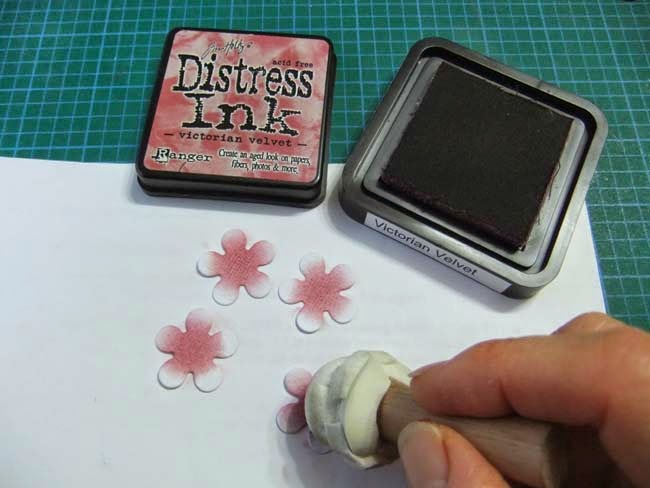
- Ranger Tim Holtz Distress Ink stamp pad (any colour) and dauber/dabber
- spray bottle filled with tap water
- stylus and molding mat
- glue


Instructions:

Step 1
Punch or diecut flowers.  You need 4 (of the same size) to make one rose.

Step 2
Apply ink to the centres of each flower as shown.

Step 3
Spray a light mist--just enough water to dampen the paper to make the ink spread.  If too wet, just let dry a bit.

Step 4
Place the flowers on a molding mat--if you don't have one, you can use a rubber mouse pad.
Curl up each petal using a stylus (with a medium-size ball)--one flower with the inked-side down (this is for the centre bud) and the other 3 flowers with the inked-side up as shown.

Step 5
Cup the flowers to form different degrees of tightness/openness as shown.  Let completely dry.  When dry the flowers will be stiff.

Step 6
Take the flower with the ink on the outside and apply glue to all 5 petals.

Step 7
Bring the petals together to form a bud a shown.  Hold together until the glue holds.

Step 8
Apply glue to the centres of the other 3 flowers.

Step 9
Layer the 3 flowers off-setting the petals, then place the bud in the centre.


There you go!  Have fun creating your own roses.


And I've done a video tutorial too!


Related Posts Plugin for WordPress, Blogger...